Loading
MATSEOTOOLS brings everything you need in one place — from AI tools List, color Library, SEO analyzers, image processing, conversion utilities, text tools, and developer tools to ready-to-use AI prompts & informative blogs.

Ease You WorkCompress, merge, and split PDFs with ease! Our free online tools make managing your documents simple and efficient. Get started today!
Boost
Build
Rank
Fast, lightweight, and delightful utilities for everyday work.
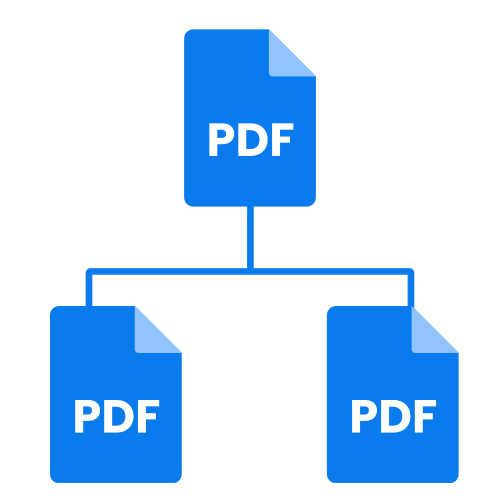
In today's digital landscape, managing PDF documents effectively is crucial for both personal and professional productivity. From sharing large reports to combining multiple files for a presentation, having the right tools at your disposal can save you significant time and effort. This article will delve into three fundamental PDF tools – the PDF Compressor Tool, the PDF Merger Tool, and the PDF Splitter Tool – explaining their functionalities, best uses, and offering expert tips for optimal results.
Understanding these tools will empower you to handle your PDF documents with greater efficiency and control, ensuring your files are always optimized for their intended purpose.
Have you ever tried to email a PDF only to be met with a "file too large" error? This is where a PDF Compressor Tool becomes your best friend. This tool reduces the file size of your PDF documents, making them easier to share, upload, and store.
How it Works: PDF compressors work by optimizing the data within your PDF. This often involves reducing the resolution of images, removing redundant data, or converting certain elements to a more efficient format. Many tools, like those found on Smallpdf or PDF24 Tools, offer different compression levels, allowing you to choose between basic and strong compression.
Expert Tip: While strong compression offers maximum file size reduction, always preview your compressed PDF to ensure the quality remains acceptable for your needs. For documents with a lot of text, the quality loss is often negligible, but for image-heavy files, a basic compression might be more appropriate to preserve visual fidelity.
Common Pitfall: Over-compressing can lead to pixelated images and blurry text. Always strike a balance between file size reduction and document quality. It's often best to test different compression settings on a copy of your document first.
Use Case: Imagine you're a student submitting a research paper with numerous high-resolution graphs. Using a PDF Compressor Tool can significantly reduce the file size, ensuring your submission goes through smoothly without compromising the readability of your data.
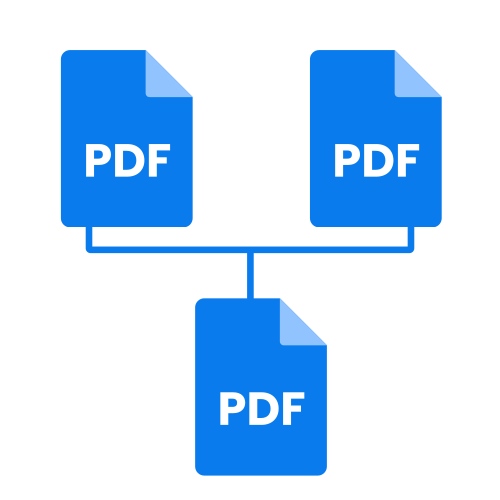
Whether you're compiling a portfolio, merging chapters of a book, or bringing together various reports into a single file, the PDF Merger Tool is an invaluable asset. This tool allows you to combine multiple PDF documents into one cohesive file.
How it Works: A PDF merger takes two or more separate PDF files and sequentially combines their pages into a single PDF. Reputable online services such as Smallpdf and iLovePDF provide intuitive interfaces where you can upload your files and often rearrange pages before merging.
Expert Tip: Before merging, take a moment to organize your individual PDF files in the order you wish them to appear in the final document. This will streamline the merging process and reduce the need for further editing.
Common Pitfall: Merging files with inconsistent page orientations or sizes can sometimes lead to an unprofessional-looking final document. It's a good practice to standardize these aspects before merging, if possible.
Use Case: A real estate agent needs to send a single document containing a property brochure, floor plans, and a contract to a client. The PDF Merger Tool allows them to effortlessly combine these separate files into one comprehensive PDF for easy viewing.
Sometimes, a single PDF document contains information that needs to be distributed separately, or perhaps you only need a few pages from a larger file. This is where the PDF Splitter Tool shines, allowing you to divide a PDF into multiple smaller files or extract specific pages.
How it Works: PDF splitters offer various options for dividing documents. You can often choose to split a PDF by page ranges (e.g., pages 1-5 as one file, pages 6-10 as another), extract every single page into its own file, or even remove specific pages from the original document. Tools like the Smallpdf Splitter and iLovePDF's Split PDF functionality provide flexible splitting options.
Expert Tip: When using a PDF Splitter Tool, identify the exact page numbers or ranges you need to extract beforehand. This precision will ensure you get exactly the sections you require without unnecessary extra steps.
Common Pitfall: Accidentally splitting a document without saving a copy of the original can lead to lost information if you need the full document again. Always ensure you have a backup or are intentionally working with a copy.
Use Case: A professor has a large PDF textbook and wants to provide students with individual chapters as separate readings. The PDF Splitter Tool allows them to quickly and accurately separate each chapter into its own PDF file.
The PDF Compressor Tool, PDF Merger Tool, and PDF Splitter Tool are more than just utilities; they are essential components of an efficient digital workflow. By leveraging these powerful tools, you can manage your PDF documents with unparalleled control and flexibility.
Ready to streamline your document management? Explore these versatile PDF tools and transform the way you interact with your files. Start optimizing, combining, and dividing your PDFs today to experience a new level of productivity.
Quickly browse through various color code models — click below to view and copy swatch-ready color codes instantly.
MATSEOTOOLS brings everything you need in one place — from AI tools List, color Library, SEO analyzers, image processing, conversion utilities, text tools, and developer tools to ready-to-use AI prompts & infomative blogs. Save time, boost creativity, and get work done faster than ever.
Fast, lightweight, and delightful utilities for everyday work.
Explore curated prompts that help you think less and create more — faster, smarter, and effortlessly. Discover ideas instantly, stay focused on what matters, and let creativity flow without the guesswork.

News & Blog